3kViews
How can I place orders through the Torus App?
Avail the benefit of managing your portfolio on a single platform which enables you to trade and invest and provides a seamless trading experience. Once your account is opened, you can follow any of the below steps as per your convenience, however, kindly ensure to check whether the demat account from which you wish to get your shares into Torus is with CDSL (Central Depository Services (India) Limited) or NSDL (National Securities Depository Limited).
If you are transferring your shares from a CDSL demat account to Torus, you can do so by following either of the options:
1)Online Method 2)Offline Method
<AH> Please follow the steps outlined below for a smooth transfer: </AH>
<AB> 1)Online Method (via only CDSL's Easiest Platform) Register for Easiest: Easiest is CDSL’s internet-based facility, which enables seamless online transactions. To get started, please complete your registration with Easiest: 1. Visit https://web.cdslindia.com/myeasitoken/home/Login and register for the Easiest facility.
![UPI 6.png]()
2. Please enter your Demat details (16-digit DP ID): The first 8 digits represent the DP ID of your source broker & next 8 digits are your unique client ID. Kindly note, this DP ID and client ID should be the ones provided by your source broker (the broker from where you are transferring the shares to TMF DP), and not the TFM DP ID or client ID.
</AB>
<AH> 1)Online Method (via only CDSL's Easiest Platform) </AH> <AB> Please follow the steps outlined below for a smooth transfer: Register for Easiest: Easiest is CDSL’s internet-based facility, which enables seamless online transactions. To get started, please complete your registration with Easiest:
1. Visit https://web.cdslindia.com/myeasitoken/home/Login and register for the Easiest facility.
![Tading 2-1.png]()
2. Please enter your Demat details (16-digit DP ID): The first 8 digits represent the DP ID of your source broker & next 8 digits are your unique client ID. Kindly note, this DP ID and client ID should be the ones provided by your source broker (the broker from where you are transferring the shares to TMF DP), and not the TFM DP ID or client ID.![Tading 2-1.png]() 3. Create a user ID and set a security question. Once completed, a confirmation request will be sent to your DP for approval. 4. Add your Trusted Account (Buyer BO ID i.e. destination account where you want the shares to be transferred. In this case your Torus demat account).
3. Create a user ID and set a security question. Once completed, a confirmation request will be sent to your DP for approval. 4. Add your Trusted Account (Buyer BO ID i.e. destination account where you want the shares to be transferred. In this case your Torus demat account).![Tading 2-1.png]()
Share Transfer Process: test text
1. Log in to your Easiest account. 2. Navigate to Miscellaneous > Edit Trusted Account and click on Add Trusted Account (Torus demat account).![Tading 2-1.png]()
</AB>
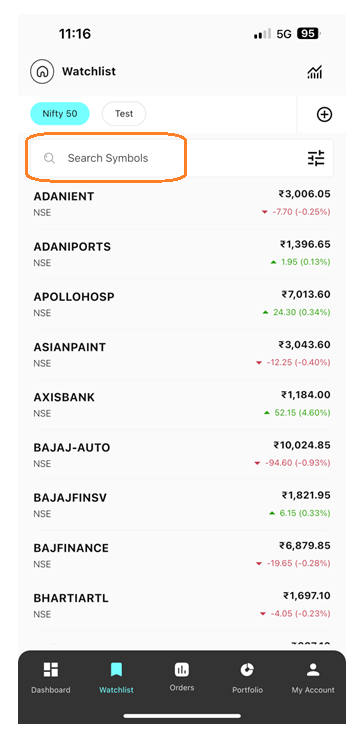
<AH> Step 3: Select the stock which you wish to buy from the watchlist.
</AH> <AB>![Trading 3-1.png]() </AB> <AH> Step 4: Click on the buy option and enter the price.
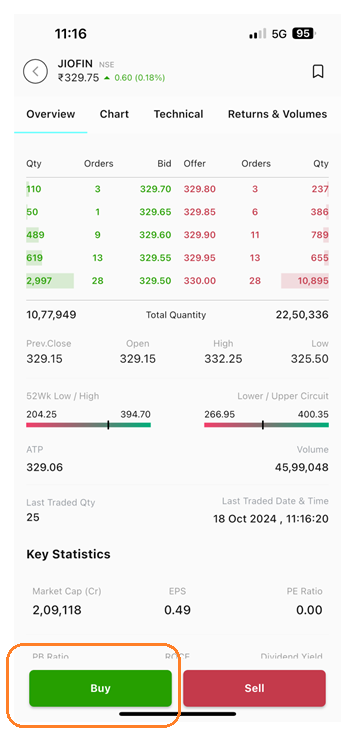
</AB> <AH> Step 4: Click on the buy option and enter the price.
</AH> <AB>![Trading 4-2.png]()
</AB>
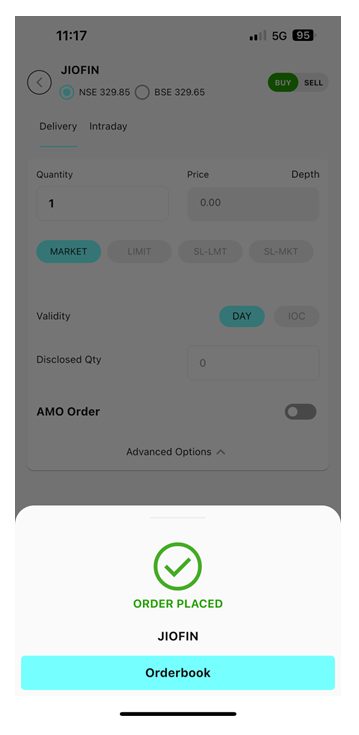
Step 5: Click on the buy option to place the order. Once the order is placed successfully you will get the conformation stating “Order Placed”
![Trading 6-3.png]() Lorem Ipsum is simply dummy text of the printing and typesetting industry. Lorem Ipsum has been the industry's standard dummy text ever since the 1500s, when an unknown printer took a galley of type and scrambled it to make a type specimen book. It has survived not only five centuries, but also the leap into electronic typesetting, remaining essentially unchanged. It was popularised in the 1960s with the release of Letraset sheets containing Lorem Ipsum passages, and more recently with desktop publishing software like Aldus PageMaker including versions of Lorem Ipsum.
Lorem Ipsum is simply dummy text of the printing and typesetting industry. Lorem Ipsum has been the industry's standard dummy text ever since the 1500s, when an unknown printer took a galley of type and scrambled it to make a type specimen book. It has survived not only five centuries, but also the leap into electronic typesetting, remaining essentially unchanged. It was popularised in the 1960s with the release of Letraset sheets containing Lorem Ipsum passages, and more recently with desktop publishing software like Aldus PageMaker including versions of Lorem Ipsum.
If you are transferring your shares from a CDSL demat account to Torus, you can do so by following either of the options:
1)Online Method 2)Offline Method
<AH> Please follow the steps outlined below for a smooth transfer: </AH>
<AB> 1)Online Method (via only CDSL's Easiest Platform) Register for Easiest: Easiest is CDSL’s internet-based facility, which enables seamless online transactions. To get started, please complete your registration with Easiest: 1. Visit https://web.cdslindia.com/myeasitoken/home/Login and register for the Easiest facility.

2. Please enter your Demat details (16-digit DP ID): The first 8 digits represent the DP ID of your source broker & next 8 digits are your unique client ID. Kindly note, this DP ID and client ID should be the ones provided by your source broker (the broker from where you are transferring the shares to TMF DP), and not the TFM DP ID or client ID.
</AB>
<AH> 1)Online Method (via only CDSL's Easiest Platform) </AH> <AB> Please follow the steps outlined below for a smooth transfer: Register for Easiest: Easiest is CDSL’s internet-based facility, which enables seamless online transactions. To get started, please complete your registration with Easiest:
1. Visit https://web.cdslindia.com/myeasitoken/home/Login and register for the Easiest facility.
2. Please enter your Demat details (16-digit DP ID): The first 8 digits represent the DP ID of your source broker & next 8 digits are your unique client ID. Kindly note, this DP ID and client ID should be the ones provided by your source broker (the broker from where you are transferring the shares to TMF DP), and not the TFM DP ID or client ID.
Share Transfer Process: test text
1. Log in to your Easiest account. 2. Navigate to Miscellaneous > Edit Trusted Account and click on Add Trusted Account (Torus demat account).
</AB>
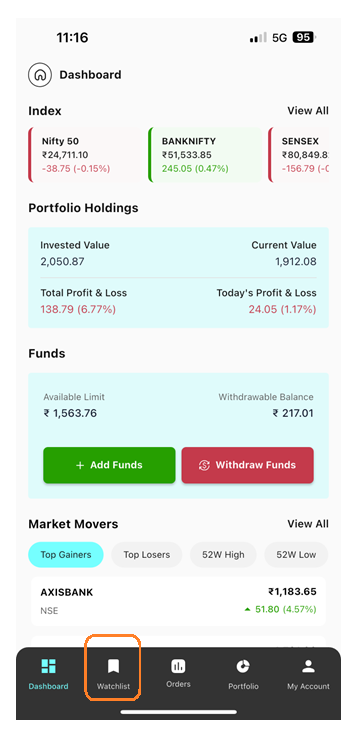
<AH> Step 3: Select the stock which you wish to buy from the watchlist.
</AH> <AB>
</AH> <AB>
</AB>
Step 5: Click on the buy option to place the order. Once the order is placed successfully you will get the conformation stating “Order Placed”
Last updated: A Year Ago


3kViews
Stocks
 How to transfer shares from other DP to Torus DP
- How to modify order?
- How much leverage is provided for Intraday orders?
- How can I convert my order from Intraday to Delivery?
- How to create a Watchlist?
- Why has the order placed not executed?
- Can I place Buy /Sell AMO Order(s) in Intraday?
- What happens if I don't square off my intraday positions ?
- Can I place Intraday Orders in preopen session?