2kViews
How to transfer funds through UPI?
You can transfer funds using UPI by following these steps. Please note that there are no charges for transferring funds through UPI mode.
Step 1 : Log In: Access your Torus account through the app.
<AH> Step 2 : Navigate to Stocks: From the main dashboard, click on "Stocks."
</AH>
<AB>![UPI 1.png]() </AB>
</AB>
<AH> Step 3 : Go to the Funds Section: In the "Stocks" section, locate and select the "Funds" section.
</AH>
<AB>![UPI 2 U.png]() </AB> Step 4 : Select Add Funds: Click on the "Add Funds" option, which will take you to the funds page.
</AB> Step 4 : Select Add Funds: Click on the "Add Funds" option, which will take you to the funds page.
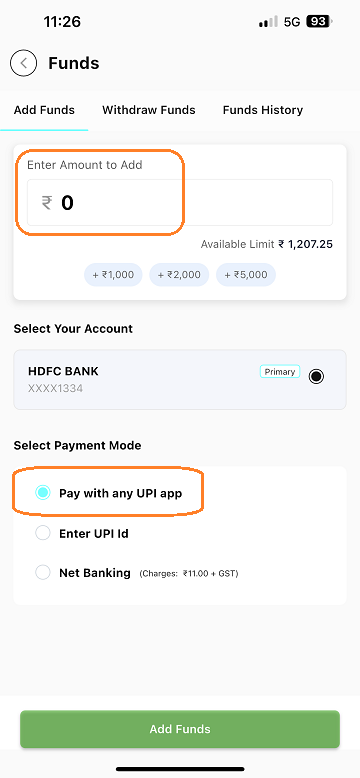
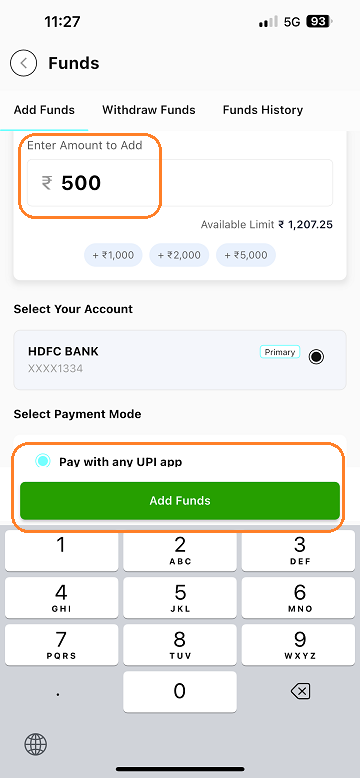
Step 5 : Enter the Amount: Enter the amount you wish to add.
<AH> Step 6 : Choose UPI as Payment Method : Select the "Pay with UPI" option.
</AH>
<AB>![UPI 3.png]()
![UPI 4-1.png]() </AB>
</AB>
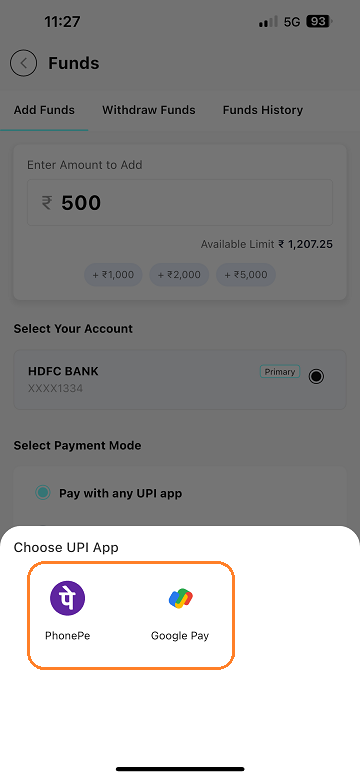
<AH> Step 7 : Select UPI App: You will be directed to a new page with various UPI options like Google Pay, PhonePe, BHIM, etc. Choose your preferred UPI app.
</AH>
<AB>![UPI 5.png]() </AB>
</AB>
<AH> Step 8 : Complete the Transaction: You will be redirected to the selected UPI app. Complete the payment process to finalize your transaction.
</AH>
<AB>![UPI 6.png]() </AB>
</AB>
Step 1 : Log In: Access your Torus account through the app.
<AH> Step 2 : Navigate to Stocks: From the main dashboard, click on "Stocks."
</AH>
<AB>

<AH> Step 3 : Go to the Funds Section: In the "Stocks" section, locate and select the "Funds" section.
</AH>
<AB>

Step 5 : Enter the Amount: Enter the amount you wish to add.
<AH> Step 6 : Choose UPI as Payment Method : Select the "Pay with UPI" option.
</AH>
<AB>
<AH> Step 7 : Select UPI App: You will be directed to a new page with various UPI options like Google Pay, PhonePe, BHIM, etc. Choose your preferred UPI app.
</AH>
<AB>
<AH> Step 8 : Complete the Transaction: You will be redirected to the selected UPI app. Complete the payment process to finalize your transaction.
</AH>
<AB>

Last updated: A Year Ago


2kViews
Add Funds
 How can I transfer funds to my Torus Digital account?
- How to transfer funds through Net Banking?
- How to transfer funds to my Torus account using IMPS, NEFT, or RTGS?
- How long will it take for the funds to get added in my Torus Digital account?
- I have transferred funds, but it is not updated in my ledger or margin.
- How to check the status of fund transfer?
- My funds transfer failed but funds got deducted. When will the amount be credited back to my account?
- If registered bank account is closed, can a I still add funds from another account? Is this possible?
- Does the bank account need to be registered to add funds via net banking?